How to Validate an OpenCV Camera Calibration Dataset Before calibrateCamera
A useful calibration dataset must constrain the camera model, not merely let OpenCV return a matrix. Audit readability, corner detection, image quality, image-plane coverage, pose diversity, duplicates, and per-view residuals before you trust the result.
Why a low OpenCV RMS is not enough
cv2.calibrateCamera minimizes reprojection error over the views it receives.
A set of many similar, centered poses can fit with a low aggregate RMS while
poorly constraining distortion near the frame edges. RMS also cannot tell you
that ten files repeat nearly the same pose.
OpenCV Calibration Audit keeps RMS as one signal and reports the dataset geometry that produced it. Per-view error is still in-sample: the same images fit the model and measure its residual. It is not independent validation.
Reproduce the small real-image analysis
The repository carries three base64-encoded OpenCV sample images with their source commit and Apache-2.0 license recorded in the fixture manifest. Decode them into a working directory, then run:
calibration-audit analyze ./real_checkerboards \
  --cols 9 --rows 6 --square-size 30 --unit mm \
  --min-valid-images 3 \
  --min-board-area 0.01 \
  --output ./audit_result
The checked-in report was generated with OpenCV 5.0.0 and version 0.2.1:
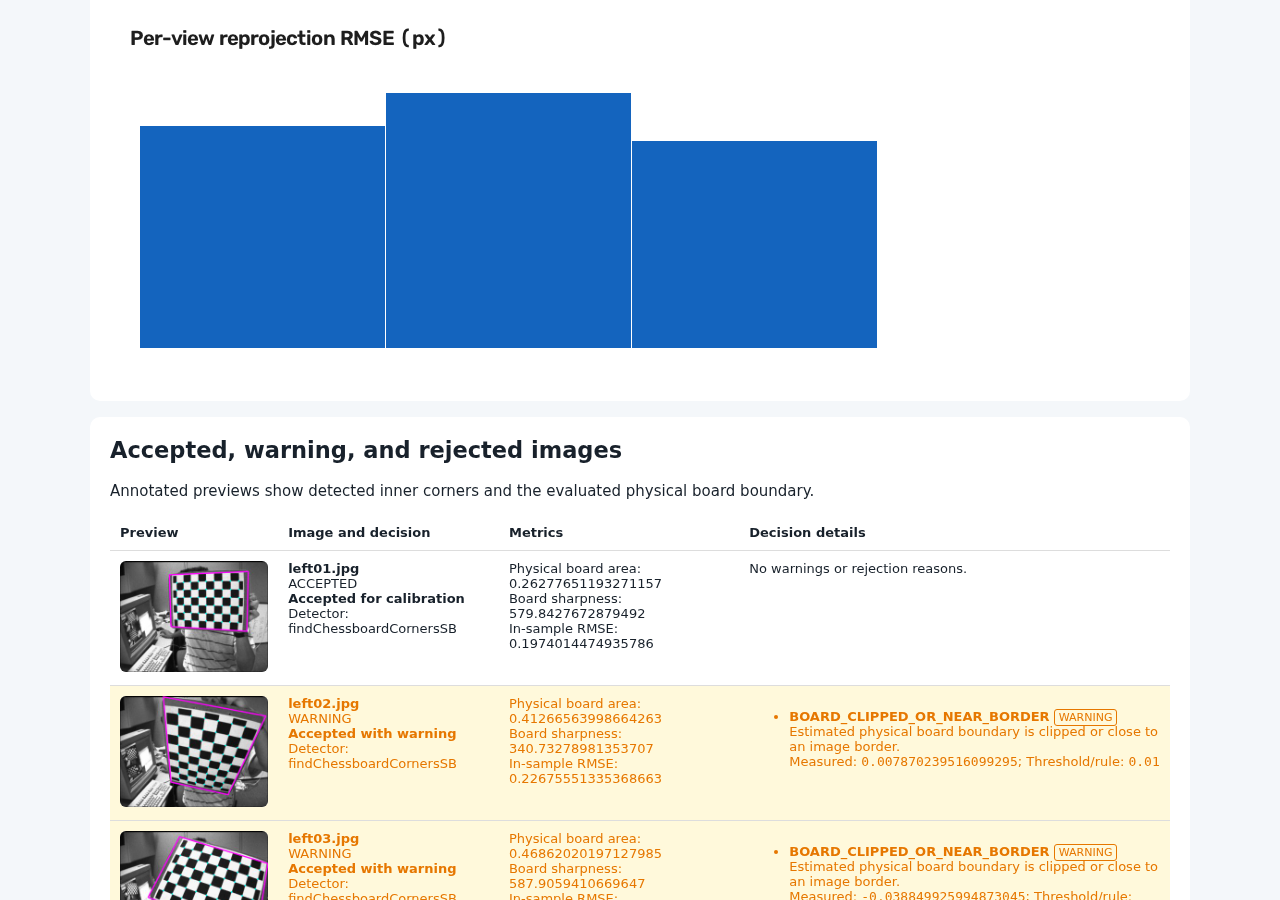
This is a smoke test, not a good-dataset benchmark. All three board centers
occupy one cell of the default 4 × 3 grid, so coverage is 1 / 12 = 0.0833,
below the default 0.35 warning threshold. Two images also warn that the
estimated physical board boundary is near or beyond the frame.
Evaluate each quality dimension
1. Readability and consistent resolution
The audit finds supported image extensions in deterministic order, decodes each file, and records unreadable or unsupported samples individually. Mixed readable resolutions stop the run because one pinhole calibration requires a single image size.
Unsigned 8-bit and 16-bit images are supported. A 16-bit sample uses a fixed
full-range value / 257 mapping for analysis so exposure remains comparable;
signed and floating-point samples are rejected.
2. Complete corner detection
The primary detector is
cv.findChessboardCornersSB.
If it fails, the default fallback uses cv.findChessboardCorners followed by
cv.cornerSubPix. A view enters geometry analysis only when all requested
inner corners are present.
3. Blur and exposure
Blur moves or destroys corner responses. The audit measures variance of the
Laplacian over the full frame and within the detected inner-corner hull. With
no --min-sharpness, a board-region value below 0.35 × the dataset median is
a warning. An explicit minimum makes low sharpness a rejection.
Exposure warnings use mean grayscale intensity and near-black/near-white pixel ratios. These simple signals expose clearly dark or bright frames; they do not model sensor saturation, bit-depth utilization, or local illumination.
4. Image-plane coverage
Lens distortion is usually least constrained where no corners are observed. The default coverage metric places each accepted board center into a 4 × 3 grid and reports occupied cells divided by 12. The report separately counts corner observations per grid cell.
Move the target toward edges and corners while keeping the full physical board visible. Coverage is a capture diagnostic, not proof that every lens parameter is identifiable.
5. Scale, rotation, and perspective diversity
Changing target distance populates different board-area bins. In-plane rotation changes edge orientation. Tilting the target in both directions changes signed horizontal and vertical perspective. These variations help the model observe distinct geometry instead of repeated copies of one view.
Rotation range is circular: 179° and -179° are about 2° apart, not
358°. See coverage and pose diversity
for formulas and trade-offs.
6. Near-duplicate poses
Two views are near-duplicates only when all configured components are close:
normalized center, log board area, wrapped rotation, and combined signed
perspective. The sharper view is kept and the other receives
NEAR_DUPLICATE_POSE.
Duplicate detection is image-derived and does not compare camera extrinsics from a prior calibration. Inspect borderline decisions before discarding capture data.
7. Reprojection error
After calibrating all accepted pre-calibration views, the audit computes:
Set --max-per-view-error to add a quality gate. High-error views are flagged
after calibration; version 0.2.2 does not silently prune and recalibrate them.
Read how reprojection error is interpreted
before choosing a threshold.
Understand accept, warn, and reject decisions
| State | Meaning | Used in calibration |
|---|---|---|
ACCEPTED |
No image-level reason was recorded | Yes |
WARNING |
Usable view with one or more warnings | Yes |
REJECTED |
A policy error makes the view unusable | No |
UNREADABLE |
The file could not be decoded or represented safely | No |
Every reason includes a stable code, severity, message, measured value, and threshold or rule. Dataset warnings such as low field coverage are stored separately from image reasons. See the complete decision-code reference.
Thresholds are heuristics
Default thresholds are starting points, not universal acceptance criteria. Sharpness depends on resolution, target scale, focus, and lens response. Coverage and diversity depend on the camera model and intended operating region. Validate thresholds using independent images and downstream error.
Use the audit as a CI quality gate
The CLI uses exit code 0 for passed gates and 1 for completed audits with a
failed gate. Invalid input/configuration uses 2; unexpected processing or
calibration failures use 3.
- name: Audit calibration dataset
  run: |
    calibration-audit analyze tests/calibration-images \
      --cols 9 --rows 6 --square-size 30 --unit mm \
      --min-valid-images 15 \
      --max-per-view-error 1.0 \
      --fail-on-warning \
      --output calibration-audit-result

- name: Preserve audit evidence
  if: always()
  uses: actions/upload-artifact@v4
  with:
    name: calibration-audit-result
    path: calibration-audit-result/
Preserve the report even on failure so a reviewer can see why the gate failed.
For organization-specific rules, parse the versioned summary.json schema
instead of scraping terminal text.
Know when to use another approach
- Use a ChArUco workflow when partial-board detection or uniquely identified corners are required.
- Use OpenCV's fisheye model for lenses that the pinhole model cannot describe.
- Use stereo calibration tooling when camera-to-camera geometry is the target.
- Use held-out capture validation, physical measurement, or task-level error when an independent accuracy claim is required.
OpenCV Calibration Audit currently handles monocular, pinhole, black-and-white-checkerboard datasets only. Read the full limitations.
OpenCV references
cv.calibrateCameraand calibration functions- OpenCV camera-calibration tutorial
cv.findChessboardCornersSB
Documentation version: 0.2.2 · Updated: 2026-07-31